Navigating CrafterBy
CrafterBy uses a sidebar grouped by what you are doing, not by database table. The groups follow the flow of work: tools, what you sell, what you hold, where you make it, who you deal with, what it costs, and what it earned.
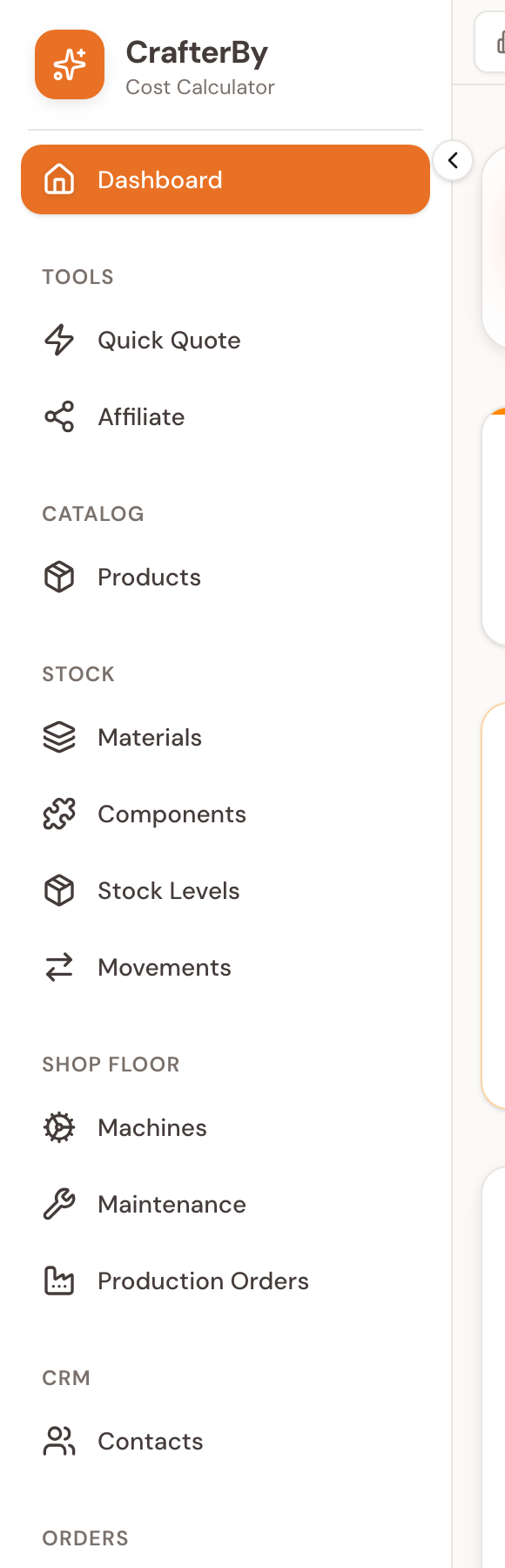
The sidebar, group by group
| Group | Items |
|---|---|
| (top) | Dashboard |
| Tools | Quick Quote, Affiliate |
| Catalog | Products |
| Stock | Materials, Components, Stock Levels, Movements |
| Workshop | Machines, Maintenance (feature-flagged), Production Orders (feature-flagged) |
| CRM | Contacts |
| Orders | Purchase Orders, Sales Orders |
| Costing | Categories, Cost Centers |
| Reports | Reports |
| Help | Help Centre |
Do not look for Cost Centers under Settings — it is in the Costing group. And Maintenance and Production Orders only appear when those features are enabled for your organization, so your sidebar may be shorter than a colleague's.
The top bar
| Control | What it does |
|---|---|
| Organization switcher | Shows the current workspace; click to search, switch, create or manage. |
| Breadcrumbs | Your path, e.g. Dashboard › Materials › New. Click any segment to go back. |
| Search | Opens a search box. See the note below. |
| Theme | Light / Dark / System. Light is the default. |
| Notifications | Currently shows 'No new notifications'. |
| Send Feedback | Opens the feedback dialog (Submit / My Reports). |
| Help | Opens the Help Centre article for the page you are on. |
| Settings | Jumps to the Settings hub. |
| Avatar | Profile, Settings, Log out. |
The header Search box and the Notifications bell are visual placeholders — neither returns live results yet. To find a record, use the search box on that module's own list page, which does work.
Finding things
Every list page (Products, Materials, Contacts, orders…) has its own search and filters at the top, and those are wired to the server. That is the reliable way to find a record.
On a phone
The sidebar collapses. You get a top bar with the logo, notifications and your avatar, a bottom navigation strip for the most-used sections, and the full menu in a slide-out.
Comments
No comments yet. Be the first to comment!
Log in with your CrafterBy account to leave a comment.
Log in to comment