Your $3 print actually costs $11
Filament is the cheapest part of the job. Machine hours, depreciation, electricity, failed attempts and post-processing are where the other $8 went. CrafterBy accounts for all of it, before you send the quote.
Free plan. No credit card required.
Illustrative worked example, not a benchmark. Your real figures depend on your printers, materials and energy tariff.

This is not a mock-up. It is the product.
A real product in a real CrafterBy workspace: a PETG headset stand. The slicer reports 185 g of filament. CrafterBy reports what the job actually consumed.
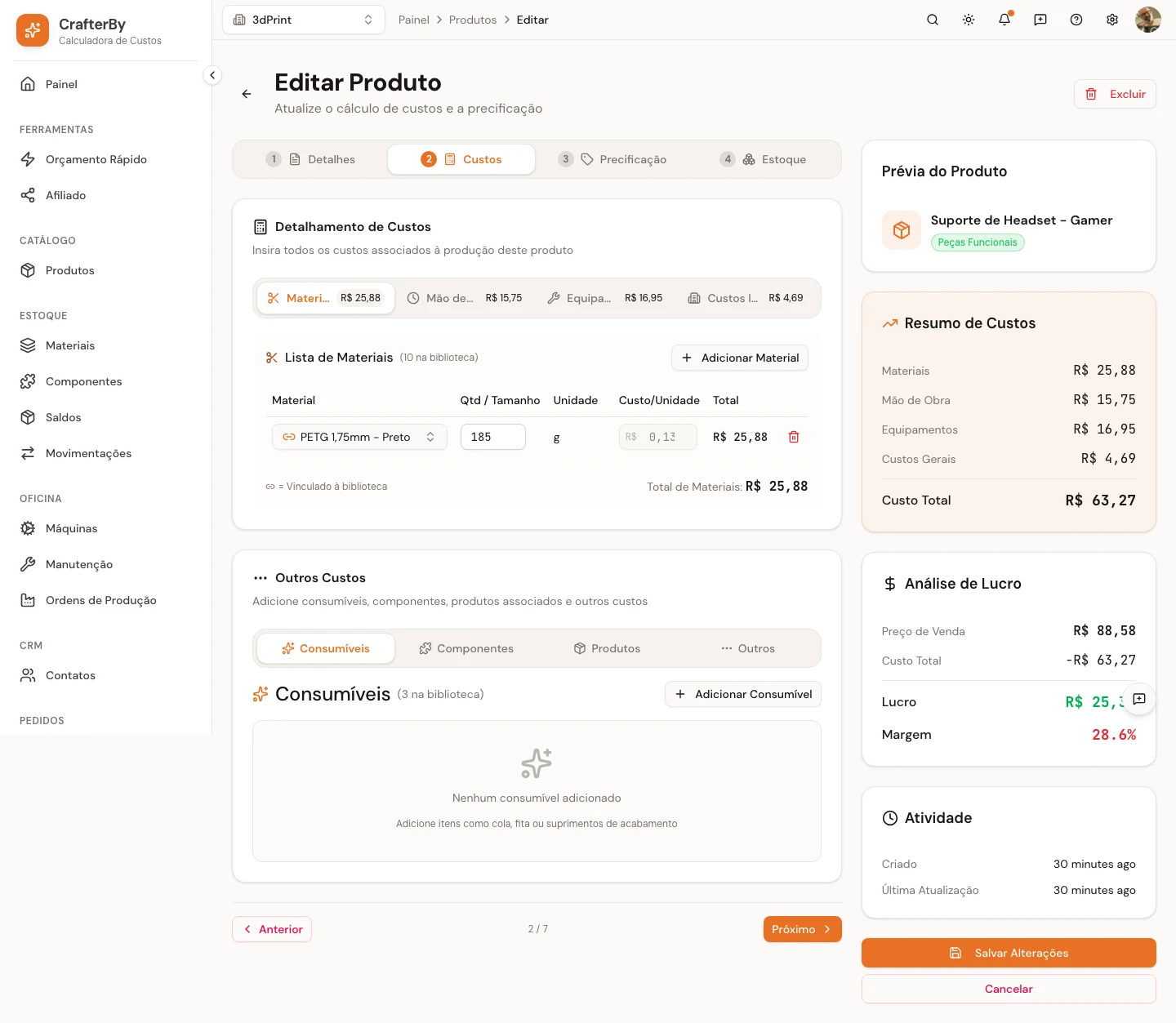
- Material (185 g PETG)
- R$ 25,88
- Labour (27 min)
- R$ 15,75
- Machine + energy (7.5 h)
- R$ 16,95
- Overhead
- R$ 4,69
- Real cost
- R$ 63,27
- Selling price
- R$ 88,58
- Margin
- 28,6%
Cost breakdown of a headset stand in CrafterBy — material, labour, machine time and overhead, separately.
Your slicer gives you grams and hours. Not costs.
Most shops price off filament weight, because it is the one number the slicer hands over. It is also the smallest line on the invoice.
What the slicer tells you
Accurate, and nowhere near enough.
- 82 g PLA — $1.85
- 6 h 20 m print time
What it leaves out
Every one of these is a real cost you are already paying.
- Printer depreciation across its working life
- Electricity drawn by the hotend, bed and chamber
- The two failed attempts before this one succeeded
- Slicing, bed prep, monitoring and spool changes
- Support removal, sanding, priming, painting
- Nozzles, belts, build plates and scheduled maintenance
Quote on filament alone and you can run at a loss for months without noticing.
Six costs in every print. Most shops track one.
CrafterBy models each layer separately, so the number you quote reflects what the job genuinely consumes.
Material and waste
Filament, resin and powder priced by the unit you actually buy them in, with a waste factor covering purge towers, brims, rafts and skirts.
Waste factor per material
Machine time and depreciation
Give each printer a purchase price and an expected working life, and CrafterBy turns print hours into a real hourly cost, including the setup and heat-up time that produces nothing.
Straight-line depreciation
Energy
Set a printer's wattage and your kWh rate. A twelve-hour print on a heated chamber costs measurably more to run than a short one on a cold bed.
Watts x hours x kWh rate
Failed prints
Scrapped units are recorded against the production stage they failed at, so the filament, hours and power spent on a failure land on the product that caused it.
Scrap tracked per stage
Labor
Slicing, bed prep, monitoring and spool swaps are real hours. Record them at your own rate instead of absorbing them for free.
Multiple labor rates per product
Post-processing
Support removal, sanding, priming, painting and assembly are separate stages, each with its own time and materials.
Stage-by-stage costing
The failed print is the cost nobody quotes for
Fourteen hours in, the part lifts off the bed. The filament is gone, the machine time is gone, the power is gone. On most shop floors that loss quietly disappears, absorbed into a margin nobody recalculates.
CrafterBy gives failure a home. Add a waste factor so every job carries its share of expected loss, or log scrapped units against a specific production stage so a bad batch is charged to the product that caused it. Either way, the number stops hiding.

From spool to quote in under a minute
Set the shop up once. Every job after that is priced in the time it takes to read the customer's email.
- 1
Add your printers and materials
Enter each printer's purchase price, wattage, expected lifespan and maintenance interval. Add your spools at what you actually paid.
- 2
Build the product
Pick materials and quantities, set print hours, add labor and post-processing stages. The full cost assembles as you go.
- 3
Set your margin and send it
Choose a markup or a target margin to get your selling price. Save it as a template and reuse it for the next variant.
Built for shops running more than one printer
A resin printer and a large-format FDM machine do not cost the same per hour, and averaging them hides which one is carrying the other. CrafterBy costs each machine on its own terms.
Set up your fleet- An individual cost per hour for every machine
- A sell price per hour, so quoted and actual can be compared
- Maintenance intervals and estimated maintenance costs
- Usage tracked per machine, month over month
Questions print shops ask
- Does this work for resin as well as filament?
- Yes. Materials are priced in whatever unit you buy them in, whether that is grams, kilograms, milliliters or liters, so resin, filament, powder and pellets are all handled the same way.
- How do I account for prints that fail?
- Two ways, and you can use both. A waste factor on a material spreads expected loss across every job that uses it. Logging scrapped units on a production order charges a specific failure to the product that caused it.
- Do I need to know my exact electricity cost?
- An estimate is enough to start. Enter your printer's wattage and the kWh rate from your bill, then refine both later without rebuilding your products.
- Can I reuse a calculation for similar prints?
- Yes. Save any product as a template and duplicate it for size variants, color changes or different customers. Update a material price once and every product using it reflects the change.
Stop guessing what your prints cost
Set up your printers and materials in an afternoon, then price every job that follows with confidence.
Free plan available. No credit card required.